
リンクなどのテキストに下線を付けることは多いと思います。
デザインによってはテキストから少し離れていたり、線の太さが2pxになっていたりと、「text-decoration-line: underline;」を指定しただけでは対応できない場合があります。
そんな時のために簡単に下線の太さや距離を調整する方法をご紹介いたします。下線に限らず、「text-decoration-line: overline;」などでも有効です。
CSSで下線の太さやテキストからの距離を調整する方法
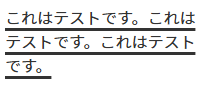
線の太さを調整するにはtext-decoration-thickness、テキストからの距離を調整するにはtext-underline-offsetを指定します。
text-decoration-line: underline;
text-decoration-style: solid;
text-decoration-color: currentColor;
text-decoration-thickness: 3px;	/* 線の太さ */
text-underline-offset: 4px; /* テキストからの距離 */
下記のように下線の太さとテキストからの距離が変わります。
あとがき
単純に下線を引きたい時は上述した方法が一番簡単だと思います。
マウスホバーなどでアニメーションさせたい場合は、テキストをspanで囲って背景グラデーションで下線を実装します。
.underline span {
  background-image: linear-gradient(to right, currentColor, currentColor); /* 線の色 */
  background-size: 100% 1px; /* 線の太さ */
  background-position: bottom; /* 配置(下線) */
  background-repeat: no-repeat;
  padding-bottom: 2px; /* テキストからの距離 */
}
テキストが折り返さず1行のみの場合は、疑似要素でも下線を表現できます。疑似要素の場合もアニメーション可能になります。
.underline::after {
  content: '';
  width: 100%;
  height: 1px; /* 線の太さ */
  background-color: currentColor; /* 線の色 */
  position: absolute;
  bottom: -2px; /* テキストからの距離 */
  left: 0;
}


コメントを残す